Faster checkout
Support barcode-led billing and practical cashier workflows for suitable retail operations.
Connect checkout, products, customers, cashier controls, inventory movement, returns, branch closing and sales reporting through one structured retail workflow.
Clear business outcome
Retail POS should improve transaction speed without separating cashier activity, stock movement, closing controls and management reporting.
Business outcome
Give cashiers a focused billing experience while management retains clearer control over products, stock, discounts, returns, branches and daily sales.
Support barcode-led billing and practical cashier workflows for suitable retail operations.
Connect sales, returns and configured adjustments to inventory movement.
Use roles, discount rules, return handling and closing processes based on approved scope.
Review store, cashier, product and branch performance through suitable reports.
Common retail challenges
Zylvoo POS is designed for retailers that need a clearer connection between transactions, inventory, cashiers, returns and reporting.
Cashiers depend on manual item search, handwritten records or disconnected billing tools.
Sales and returns do not immediately support accurate inventory records.
Authorization and reason tracking are unclear across cashier activity.
Store totals, cashier records and sales reports require repeated manual reconciliation.
Solution overview
Zylvoo Retail POS combines a focused checkout experience with the product, inventory, customer, cashier and branch controls selected for the business.
Support fast product selection, barcode scanning, customers, payments, discounts and receipts for authorized cashiers.
Connect inventory movement, daily closing, branch views and accounting handoff where the selected setup supports it.
Retail POS capabilities
Hardware, payment, tax, accounting and branch behavior are confirmed against the retailer’s environment and implementation scope.
Use a focused checkout workflow designed for efficient product and payment entry.
Scan configured product barcodes where supported hardware and setup are available.
Maintain products, categories, prices, barcodes and selected retail attributes.
Connect suitable sales, returns and adjustments to stock quantities and movement records.
Record selected customer information and transaction context where required.
Assign roles and restrict sensitive checkout, discount, return or closing actions.
Apply configured discount rules and authorization requirements.
Process suitable returns through a controlled transaction and stock workflow.
Review cashier or store totals using the approved closing process.
Support branch-specific operations and reporting where included in architecture and permissions.
Analyze sales, products, cashiers, returns and selected retail performance views.
Connect suitable retail transactions to Accounting ERP or another approved system by configuration or integration.
Product experience
Approved local screenshots can replace the built-in fallback automatically. The website never loads random external images or fake live dashboards.
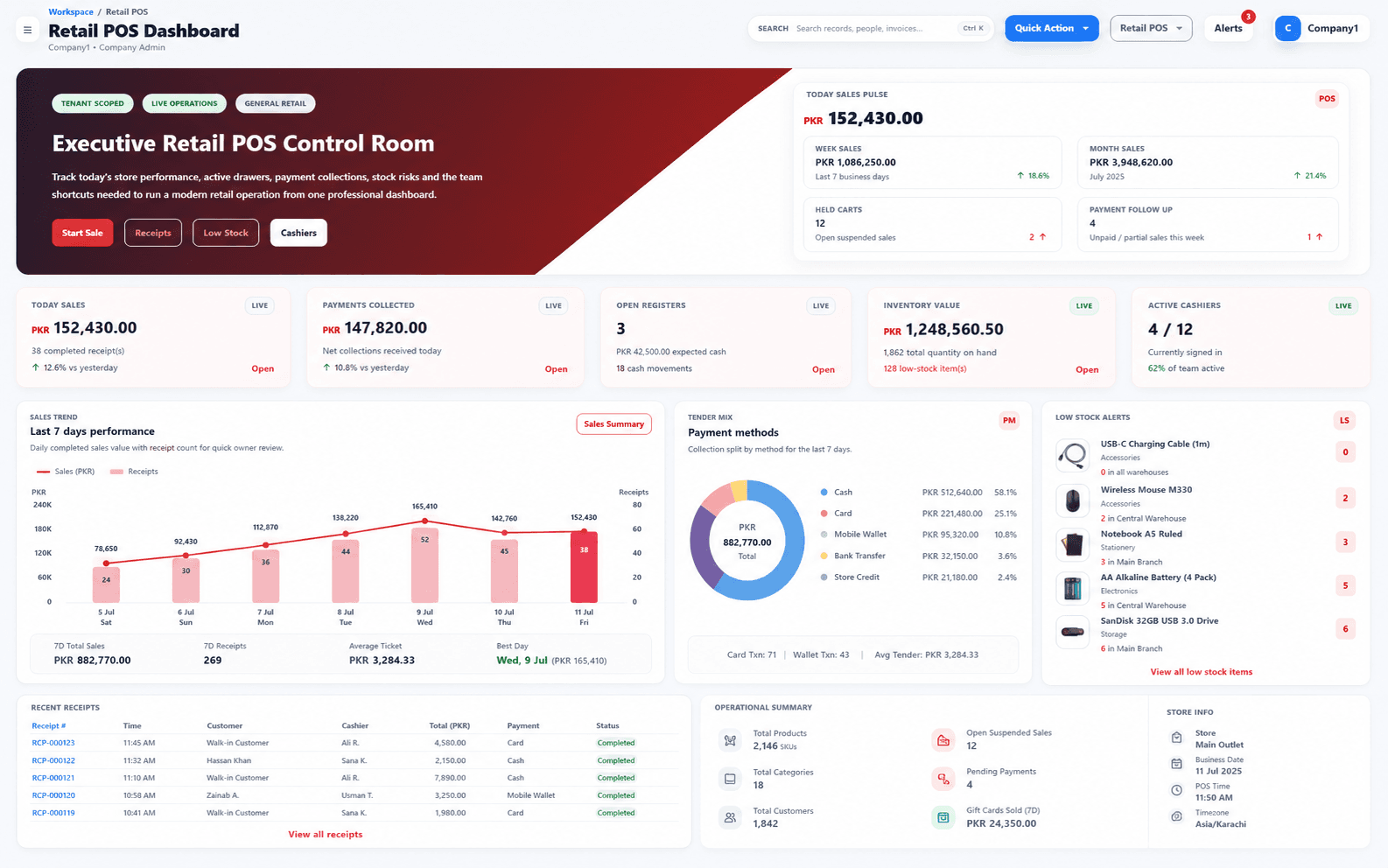
Retail POS dashboard
Product preview will appear here when the approved Zylvoo screenshot is added.
A management view for current retail, cashier and store activity.
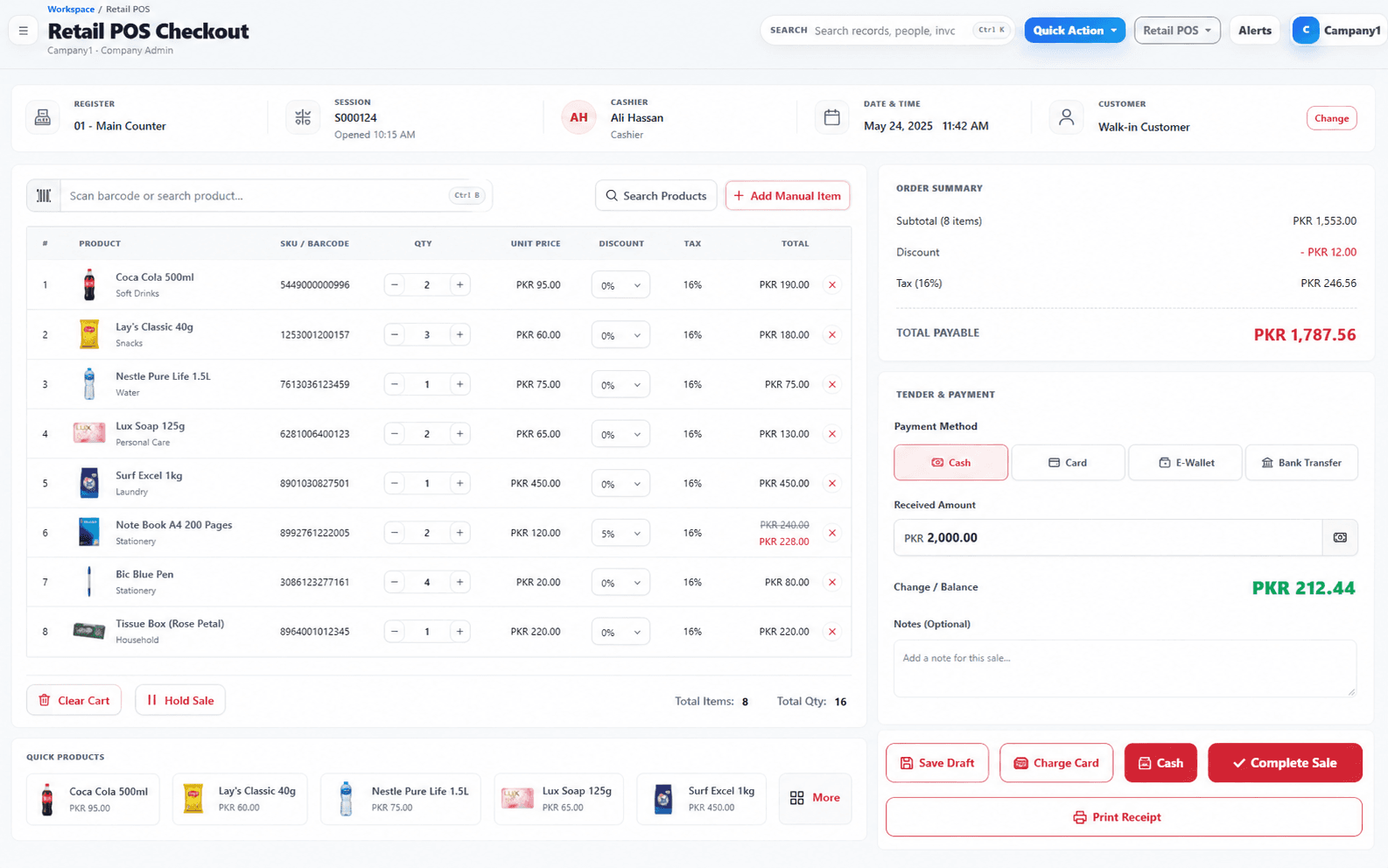
POS checkout
Product preview will appear here when the approved Zylvoo screenshot is added.
A focused billing screen for product scanning, customer and payment handling.
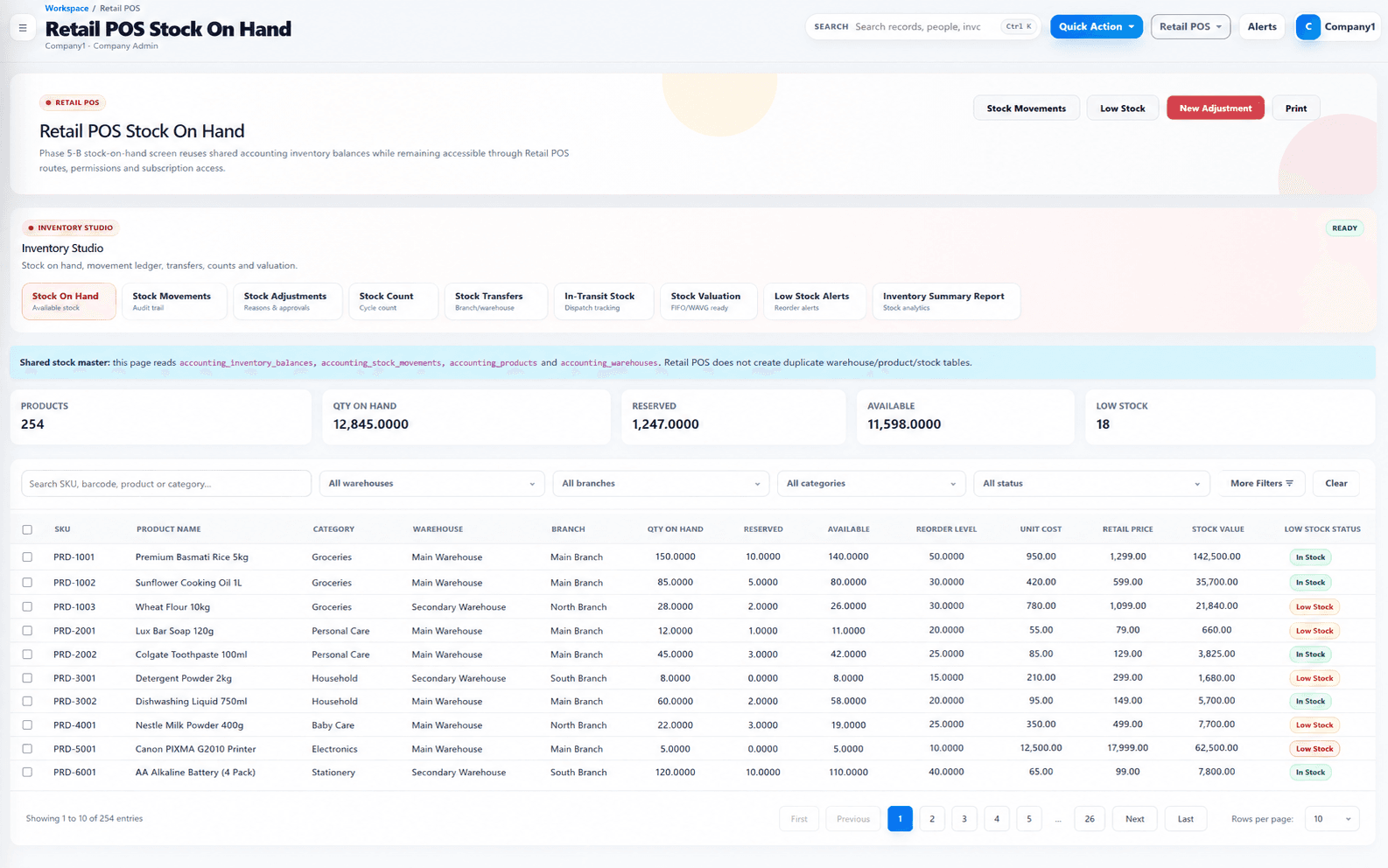
Inventory dashboard
Product preview will appear here when the approved Zylvoo screenshot is added.
A stock-focused view for products, movement and availability reporting.
Approved real product screenshots will replace safe fallbacks at the documented local paths. No external or fabricated dashboard image is displayed.
Workflow demonstration
This example is modular. Payment, tax, branch and accounting steps are configured for the approved retail process.
Connected retail workflow
A completed checkout transaction can update product movement and feed the approved closing and reporting process.
Scan or select products and complete the authorized checkout transaction.
Adjust configured inventory quantities for sold or returned items.
Retain user, discount, payment and return context for review.
Review store or cashier totals through the agreed process.
Update retail reporting and configured finance integration.
Barcode hardware, printers, payment devices, taxes, offline behavior and accounting integration require environment-specific validation and are included only when agreed in scope.
Reports and dashboards
Reporting depends on configured data, branches, user permissions and the selected transaction workflow.
Review current sales totals, trends and selected retail performance information.
Analyze product movement, availability and selected stock information.
Review user activity, discounts, returns and daily closing information.
Compare approved store or branch views where multi-branch capability is configured.
AI-ready retail workflows
AI features are optional and configured only after product data, permissions and business rules are assessed.
Prepare readable summaries from authorized sales, product or branch reports.
Highlight configured low-stock, unusual movement or review conditions for authorized users.
Explore authorized sales or inventory information through a controlled assistant.
Integrations, customization and deployment
The final setup depends on checkout hardware, branches, product data, taxes, payments, accounting flow, network and deployment requirements.
Assess barcode scanners, receipt printers, selected payment devices, Accounting ERP or third-party systems where interfaces allow.
Configure products, prices, discounts, returns, receipts, cashier roles, branch views and reports based on approved retail rules.
Plan cloud, store or private deployment based on network reliability, data access, backup and support needs.
Implementation process
The rollout includes retail discovery, product and pricing data preparation, hardware checks, configuration, UAT, cashier training and controlled launch.
Understand the business, current tools, users, priorities and operational challenges.
Map the recommended system, workflows, integrations, controls and reporting approach.
Confirm included modules, responsibilities, assumptions, exclusions and delivery priorities.
Configure approved capabilities or build the agreed custom features and integrations.
Prepare, validate and transfer suitable data using the agreed migration plan.
Verify functionality, permissions, workflows, reports and user acceptance against scope.
Train relevant users, complete readiness checks and move the approved system into use.
Provide agreed maintenance, issue handling and future improvement planning after launch.
Demo video and live access
Use approved screenshots, a future walkthrough, a centrally managed live demo or a guided session focused on your store process.
Approved recording pending
An approved checkout recording can be added later. The current state remains transparent and does not simulate a live store, customer or payment environment.
Illustrative proof
This sample implementation describes an expected operating workflow without claiming a real client or measured result.
Initial challenge
Checkout, returns, stock movement and daily closing are handled in separate records, making store control and reporting slower.
Illustrative workflow
Connect barcode billing, cashier permissions, inventory movement, returns, daily closing, branch reporting and an approved accounting handoff.
Modules in the example
Expected operational benefits
Sample implementation. No named retailer, verified percentage, revenue result, customer quotation or certification is claimed.
Tailored Retail POS pricing
Pricing depends on terminals, branches, products, inventory requirements, hardware, accounting integration, migration, training and support.
Retail POS FAQs
Hardware, inventory, branches, payments and accounting integration are assessed against the real retail environment.
Standard scanner workflows can be supported when compatible hardware, product barcodes and the operating environment are confirmed during implementation.
Multi-branch operation can be included where branch data, users, products, stock and reporting requirements are designed into the selected architecture.
Yes, suitable retail transactions can connect to Zylvoo Accounting ERP or another approved system through configuration or scoped integration.
Suitable permissions, reason capture and approval controls can be configured based on the retailer’s policies and user roles.
Hardware supply and compatibility are not assumed. Required scanners, printers, drawers or payment devices must be identified and validated as part of scope.
Offline capability is not implied by default. It requires a separately designed and tested synchronization approach based on store and network requirements.
Improve retail control
Discuss your stores, terminals, products, devices, inventory process, cashier controls and accounting requirements with Zylvoo.