Stronger financial control
Keep chart of accounts, transactions and user responsibilities in a structured system.
Connect accounting, sales, purchases, receivables, payables, cash, bank and inventory records so management can review operations through one structured system.
Clear business outcome
Reduce fragmented spreadsheets and delayed reconciliations by using structured transactions, permissions and management reporting.
Business outcome
Give management a clearer view of sales, purchases, balances, cash, bank, stock and financial position from one controlled accounting workflow.
Keep chart of accounts, transactions and user responsibilities in a structured system.
Track receivables, payables and transaction history with better visibility.
Link suitable sales and purchase activity to stock movement and reporting.
Review current financial and operational information without rebuilding reports manually.
Common finance challenges
Accounting ERP is suited to growing businesses that need consistent transactions, balances, stock records and reporting across users or companies.
Sales, purchases, payments and balances are repeatedly combined for reporting.
Outstanding balances and due items are reviewed through inconsistent records.
Inventory movements and financial entries are updated separately or reconciled late.
Profit, balance sheet and operational views require manual preparation and correction.
Solution overview
Zylvoo Accounting ERP supports a modular implementation, allowing the business to select the finance, transaction, inventory and reporting capabilities required for its operation.
Organize the chart of accounts, vouchers, cash, bank, receivables, payables and financial reporting for authorized users.
Bring sales, purchases and inventory movement into an agreed workflow so operational records support finance and management views.
Accounting ERP capabilities
Features, reports and controls are configured against the organization’s accounting structure, workflow and implementation scope.
Maintain chart of accounts, journals or transaction records within the approved accounting setup.
Record sales transactions, invoices, customer activity and related operating details.
Record supplier purchases, invoices and related transaction information.
Review customer balances, receipts and outstanding items through structured records.
Track supplier balances, payments and due amounts for authorized users.
Maintain approved cash and bank activity, balances and transaction history.
Connect suitable purchase, sale and adjustment activity to stock records and reporting.
Prepare profit and loss, balance sheet and other configured accounting reports.
Present selected financial and operational indicators in one management view.
Control access to companies, transactions, reports and administrative functions.
Support multiple company contexts where included in the selected architecture and permissions.
Retain suitable user and transaction context to support review and operational accountability.
Product experience
Real approved screenshots can be placed at the existing paths. The fallback component prevents broken images and avoids presenting fabricated screens as live product evidence.
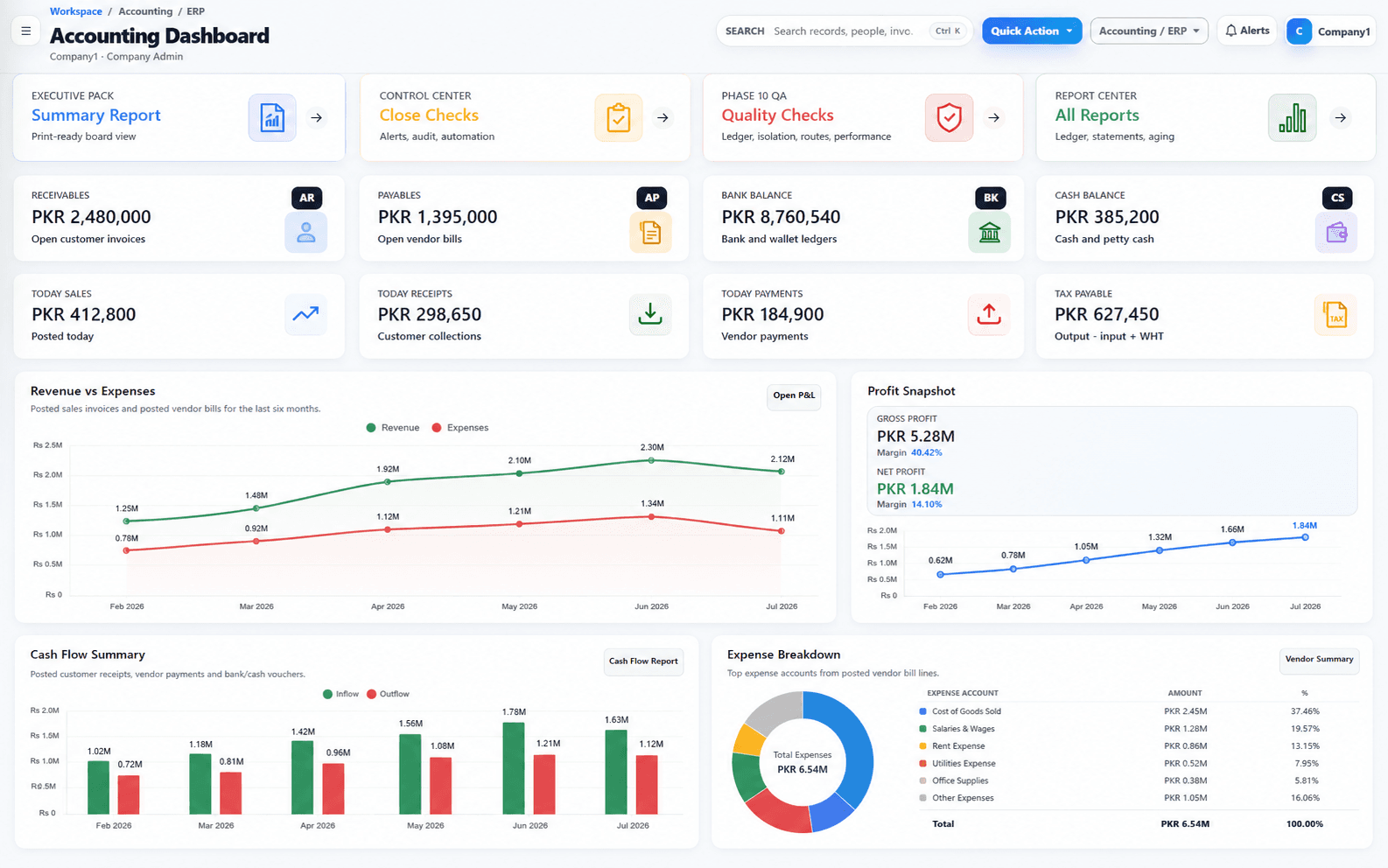
Accounting ERP dashboard
Product preview will appear here when the approved Zylvoo screenshot is added.
A consolidated financial and operational management view.
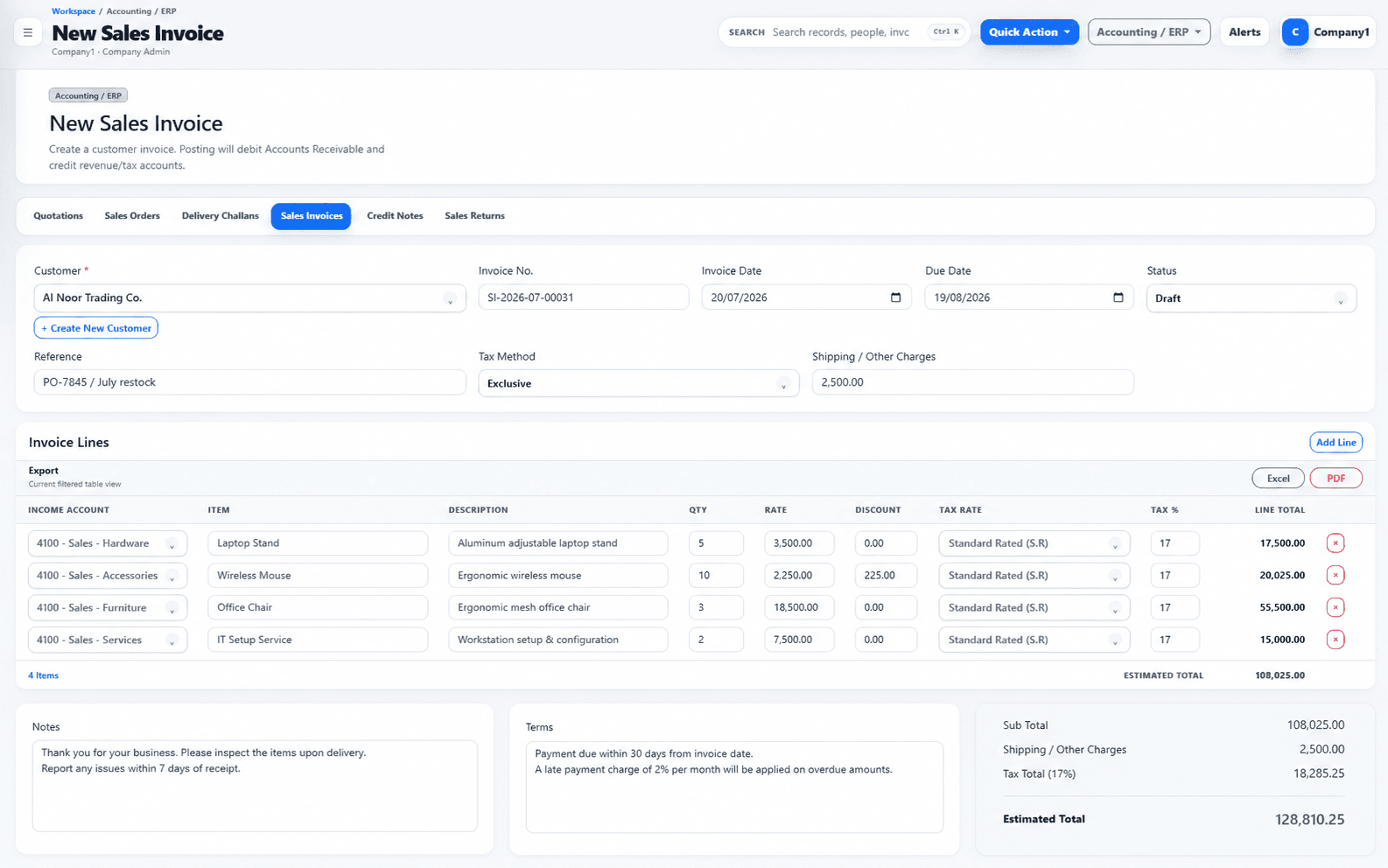
Invoice management
Product preview will appear here when the approved Zylvoo screenshot is added.
A structured sales or purchase invoice workflow for authorized users.
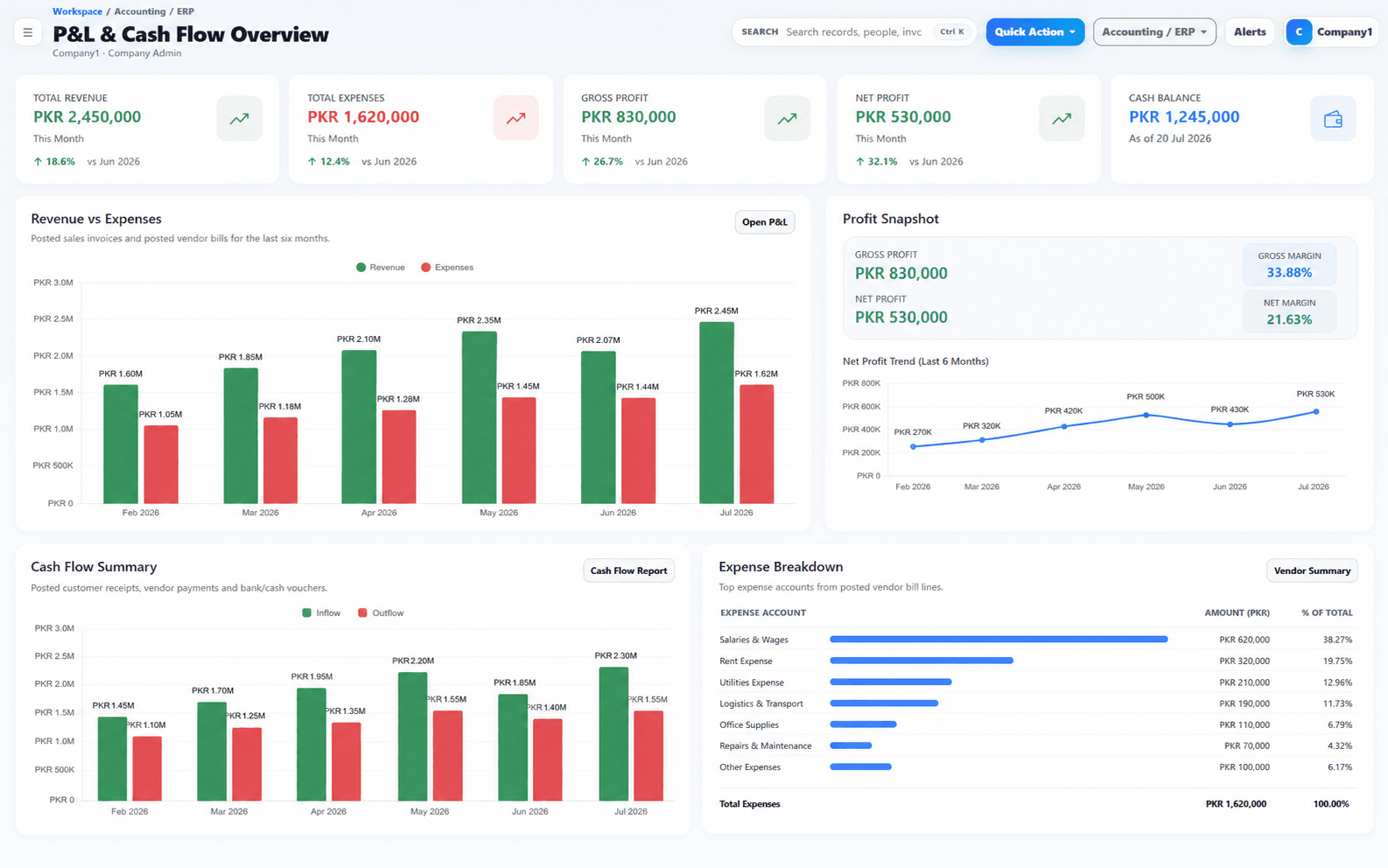
Financial reports
Product preview will appear here when the approved Zylvoo screenshot is added.
A future approved view for profit and loss, balance sheet and supporting reports.
Approved real product screenshots will replace safe fallbacks at the documented local paths. No external or fabricated dashboard image is displayed.
Workflow demonstration
The exact posting, approval and inventory behavior depends on configured modules and accounting rules.
Connected finance workflow
A completed transaction can update the related operating and financial records without requiring separate manual reporting files.
Record the approved customer transaction and required detail.
Adjust suitable stock records when inventory is included.
Post the configured financial effect to the relevant accounts.
Refresh customer, cash, bank or other affected balances.
Present current financial and operational information for review.
Posting rules, taxes, approvals, costing and financial statements are configured and validated against the agreed accounting requirements; this page does not replace professional accounting review.
Reports and dashboards
Report availability and detail depend on the selected modules, chart of accounts, transaction quality and permissions.
Prepare configured profit and loss, balance sheet and related financial views.
Review customer and supplier balances, due items and transaction history.
Review stock quantities, movements and selected valuation or item information where configured.
Combine selected sales, purchase, cash, bank, stock and finance indicators for authorized management users.
AI-ready finance workflows
AI capabilities are optional and must respect financial permissions, data quality, review requirements and project scope.
Prepare readable summaries from authorized reports for management review.
Highlight configured overdue, unusual or exception records for a user to investigate.
Explore authorized accounting or inventory information through a controlled conversational interface.
Integrations, customization and deployment
Configuration can address companies, branches, users, documents, approvals, reports, integrations and deployment requirements within approved scope.
Assess POS, banking files, third-party applications, reporting or API connections where suitable interfaces are available.
Configure documents, account structures, approvals, dashboards and reports around the agreed business process.
Plan cloud or private deployment based on access, infrastructure, backup and support requirements.
Implementation process
The rollout combines discovery, solution design, data preparation, configuration, testing, training and controlled transition into live use.
Understand the business, current tools, users, priorities and operational challenges.
Map the recommended system, workflows, integrations, controls and reporting approach.
Confirm included modules, responsibilities, assumptions, exclusions and delivery priorities.
Configure approved capabilities or build the agreed custom features and integrations.
Prepare, validate and transfer suitable data using the agreed migration plan.
Verify functionality, permissions, workflows, reports and user acceptance against scope.
Train relevant users, complete readiness checks and move the approved system into use.
Provide agreed maintenance, issue handling and future improvement planning after launch.
Demo video and live access
Review approved screenshots, a future product walkthrough, a managed live demo or a guided session focused on your finance and inventory process.
Approved recording pending
The website is ready for an approved demonstration video. Until supplied, this state remains clearly labeled and does not use a fake dashboard video or customer environment.
Illustrative proof
This scenario is intentionally labeled as illustrative and contains no invented client or result.
Initial challenge
Sales, purchases, stock, receivables, payables and finance are maintained in separate spreadsheets with delayed reconciliation and reporting.
Illustrative workflow
Connect transaction entry, inventory movement, customer and supplier balances, cash and bank activity, and management reports inside one controlled ERP process.
Modules in the example
Expected operational benefits
Illustrative case study. No named company, verified metric, revenue increase, percentage improvement or client quotation is claimed.
Tailored Accounting ERP pricing
Pricing depends on modules, companies, users, branches, transaction workflows, reports, migration, integrations, deployment and support.
Accounting ERP FAQs
The final setup is confirmed against accounting structure, transaction workflows, users, data and deployment needs.
Yes. A modular rollout can begin with selected accounting functions and add inventory, sales, purchases or other approved capabilities later.
Multi-company or branch use can be included where the required data separation, permissions, transactions and reporting are defined in scope.
Suitable masters, opening balances or approved history can be migrated after mapping, cleanup and validation. The achievable history depends on data quality.
Yes, where the selected modules and transaction flow are configured together or a suitable integration is included in scope.
Cloud or private deployment can be assessed based on infrastructure, access, backup, support and security requirements.
Suitable reports, documents, controls and approvals can be configured or developed after the requirements and data structure are confirmed.
Improve financial visibility
Discuss your companies, users, transaction process, inventory needs, reporting and migration requirements with Zylvoo.