
Manual data entry
01Teams repeat the same information across files, departments and reports.
Zylvoo helps growing companies automate accounting, HR, payroll, retail operations, school management and custom workflows through reliable business software, AI integration, cloud deployment and long-term support.
One partner
Strategy to support
Modular
Start where needed
Flexible
Cloud or on-premise
Business Command Center
A clearer view of connected operations
Financial overview
Management dashboard
Revenue
PKR 8.4M
Receivables
PKR 1.2M
Cash & bank
PKR 3.1M
Performance trend
Operational visibility
Recent financial activity
Sales invoice posted
Updated automatically
Supplier payment approved
Updated automatically
Inventory value updated
Updated automatically
Zylvoo connects y
HR, attendance, payroll and employee services stay connected in one controlled workflow.
Modular business software
01Deploy the right modules first.
Secure role-based access
02Control access by responsibility.
Multi-company ready
03Support structured business growth.
Cloud deployment
04Flexible hosted infrastructure options.
Implementation and training
05Guided setup and user enablement.
Long-term support
06Ongoing maintenance and assistance.
Operational clarity
Manual tools can support a business for a while, but they become harder to control as teams, transactions, branches and reporting needs grow.
Teams repeat the same information across files, departments and reports.
Management waits for reconciliations before seeing an accurate business position.
Disconnected attendance, leave and overtime records create avoidable payroll work.
Sales, purchasing and inventory updates do not always reach the same record on time.
Finance, operations, HR and management work from different versions of the truth.
Requests move through messages and paper trails without clear ownership or status.
Important indicators are scattered instead of available in one structured dashboard.
Processes become fragile when users, branches, products or reporting requirements increase.
A connected operating model
Zylvoo brings workflows, reporting and controlled access into a practical software foundation that can grow module by module.
Give authorized teams a consistent source for operational and management data.
Reduce duplicate entry, routine calculations and manual hand-offs between teams.
Link transactions, approvals and records across the parts of the business that depend on them.
Move from delayed spreadsheet consolidation to structured operational and financial views.
Use validations, permissions and repeatable processes to improve control.
Surface key information in dashboards designed for faster, better-informed decisions.
Introduce summaries, assistance and alerts where the approved project scope supports them.
Start with the highest-priority workflow and add capabilities as the business grows.
Zylvoo connects the records, approvals and management views that normally sit across separate files and tools. Start with one priority workflow, then expand without rebuilding the foundation.
Transactions, stock movement and reporting stay connected instead of being reconciled later.
Attendance, leave, overtime and payroll move through one controlled workflow.
Dashboards, alerts and practical AI summaries turn operational records into faster decisions.
08
98%
24
Finance
Live controls
People
Payroll ready
Operations
Stock connected
Intelligence
Decision signals
Zylvoo Core
One data layer
Modular growth
Add capability without adding chaos
Approved Zylvoo solutions
Choose a ready business solution, connect AI to an existing workflow, or commission software designed around your own process.
Better financial control and stock visibility
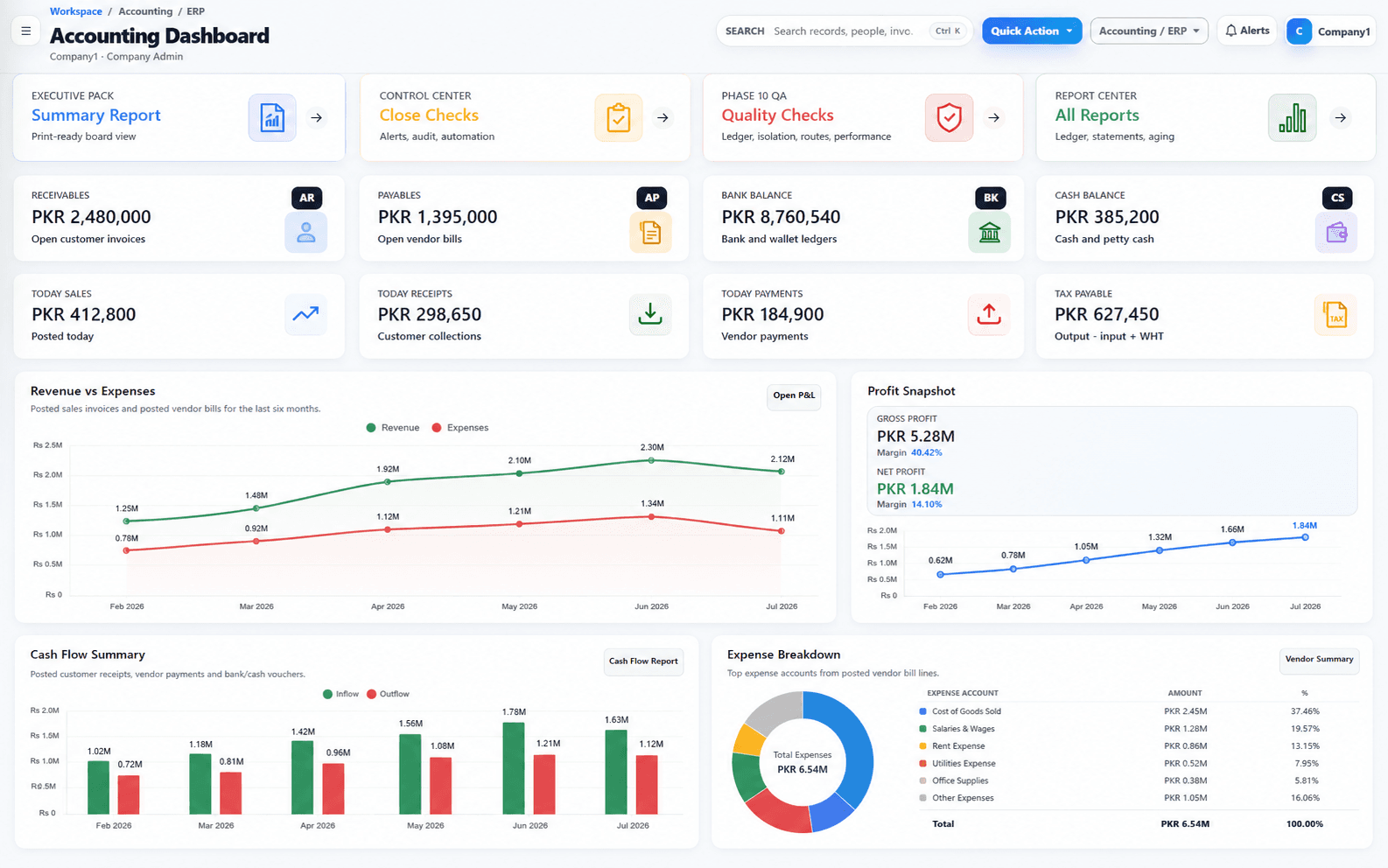
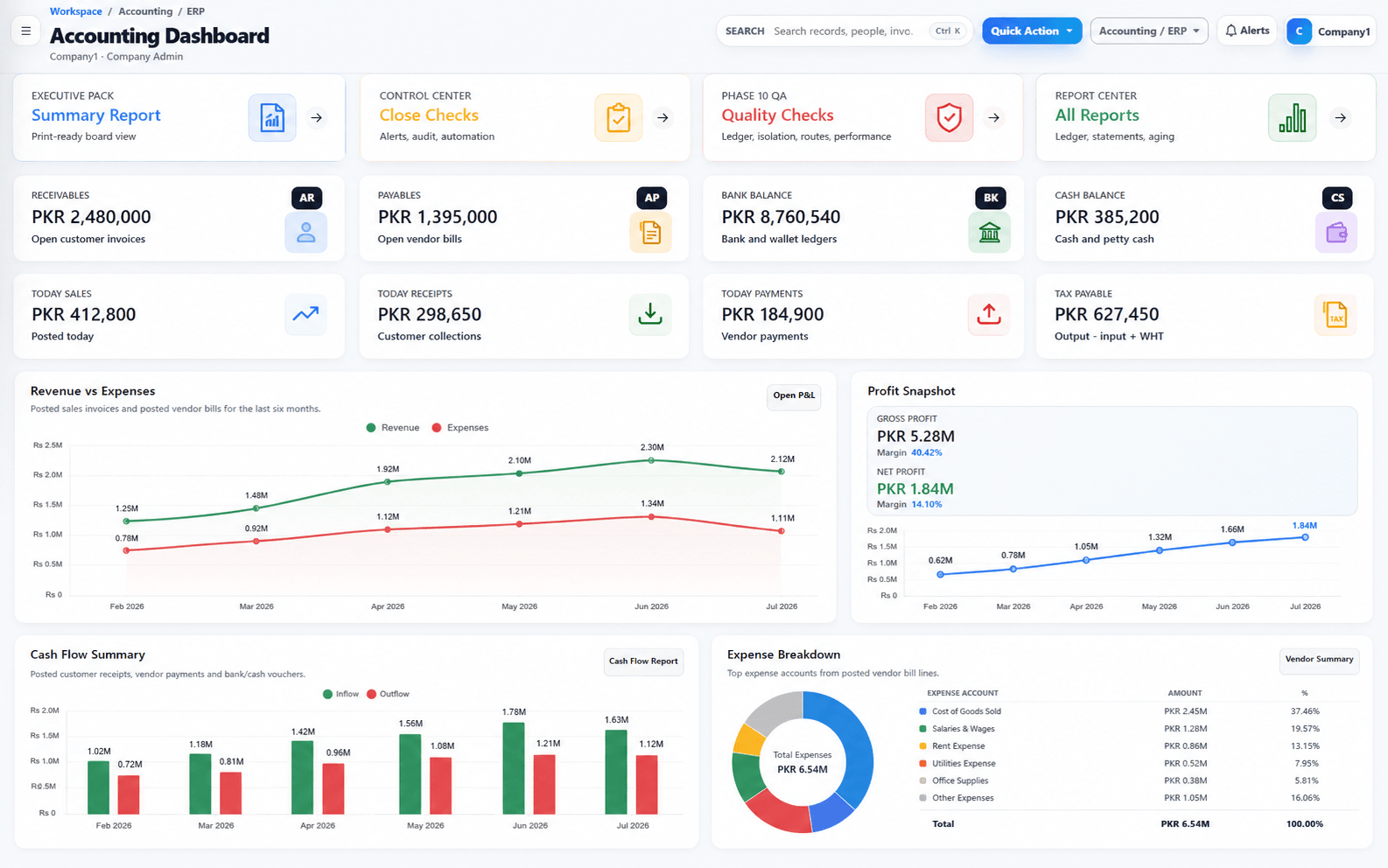
Connect accounting, sales, purchases, cash, bank and inventory in one controlled system.
Explore Accounting ERPFaster insight and less repetitive work
Add practical assistance, summaries, document processing and workflow alerts to approved systems.
Explore AI IntegrationA clearer attendance-to-payroll process
Connect employee records, shifts, attendance, leave, overtime, payroll and HR reporting.
Explore HRMSFaster billing with accurate stock control
Support fast billing, cashier controls, stock updates, branch operations and sales reporting.
Explore Retail POSSimpler academic and fee administration
Centralize students, admissions, attendance, fees, academic records and school reporting.
Explore School ManagementSoftware aligned with the way your business works
Map unique workflows, approvals, dashboards, integrations and internal business tools.
Discuss Custom SoftwareA stronger digital presence and lead journey
Build professional corporate, product and SaaS websites focused on performance and conversion.
Explore Custom WebsitesFeatured solution
Bring core finance, sales, purchasing and inventory records into a structured system with role-based access and management reporting.
Financial overview
Management dashboard
Revenue
PKR 8.4M
Receivables
PKR 1.2M
Cash & bank
PKR 3.1M
Performance trend
Operational visibility
Recent financial activity
Sales invoice posted
Updated automatically
Supplier payment approved
Updated automatically
Inventory value updated
Updated automatically
Financial control
Structured records
Inventory visibility
Connected movement
Management reporting
Clearer decisions
Connected workflows
Each workflow is modular. Zylvoo connects the records and approvals needed for the selected solution rather than forcing every business into one fixed setup.
Finance workflow
A completed sale can update stock, accounting records and management reporting through a controlled workflow.
Transaction completed
Stock quantity adjusted
Financial record posted
Current figures refreshed
Available by scope
Zylvoo can connect approved AI capabilities to existing software, documents and reporting processes without presenting experimentation as a finished standard feature.
Scope-first implementation
AI capabilities are available through configuration or custom integration and are confirmed against data access, privacy, security and project scope.
Zylvoo Intelligence
Management signal workspace
Ask across your operation
Where should management focus this week?
Receivables
7 accounts need review
Inventory
3 unusual variances
Payroll
2 exceptions pending
Priority signal
Suggested action
Prioritize overdue balances before the next purchase cycle.
Decision confidence
86%
Guide users, answer approved questions and support structured lead or service journeys.
Explore authorized business information through a controlled conversational interface.
Prepare readable operational, financial or HR summaries from approved data sources.
Extract and route defined information from business documents where the workflow supports it.
Highlight exceptions, trends or required reviews using configured business rules and data.
Connect AI functions through secure APIs and project-specific integration planning.
Relevant business environments
Zylvoo serves growing organizations that need stronger operational control, connected reporting and software that can adapt to approved workflows.
Connect billing, products, stock, branches, cashier controls and financial reporting.
Improve purchasing, sales, receivables, payables, inventory and management visibility.
Centralize student, fee, attendance, academic and administrative records.
Structure people operations, approvals, reporting, client workflows and internal tools.
Configure project approvals, workforce records, financial controls and management dashboards.
Improve controlled access, branch visibility, standardized processes and consolidated reporting.
Build clearer customer, staff, approvals, billing and delivery workflows around the service model.
Map specialized processes without presenting an unapproved ready-made industry product.
Why Zylvoo
Zylvoo combines practical software design, structured implementation and long-term support so growing organizations can improve control without adopting unnecessary complexity.
Requirements are translated into workflows, permissions and reports that support day-to-day operations.
Start with the highest-priority modules and expand through a controlled roadmap as needs grow.
Configure approvals, forms, dashboards and outputs around approved business requirements.
Introduce practical AI assistance where data access, security and project scope support it.
Assess cloud, private and on-premise options according to operational and infrastructure needs.
Plan the structured transfer of suitable records from spreadsheets or existing systems.
Support administrators and end users with role-relevant guidance before and after go-live.
Continue with agreed maintenance, issue handling and improvement support after implementation.
See the software before you decide
Review product screens, watch focused demonstrations, request controlled live access or arrange a guided session around your own requirements.
Live access appears only when an approved demo environment is available and enabled.
Review key dashboards, forms, reports and workflow screens for each approved solution.
See focused walkthroughs of important tasks without committing to a full sales meeting.
Use an available demonstration environment with configured access instructions and restrictions.
Discuss your process with the Zylvoo team and focus the session on relevant modules and decisions.
Implementation process
Each engagement is organized around clear requirements, controlled delivery, user validation and a practical transition into live operations.
People-first delivery
Discovery, configuration, training and support are treated as one implementation journey—not separate hand-offs.
Implementation Studio
ERP rollout · Phase 02
Delivery roadmap
Discovery
Complete
Configuration
In progress
Training
Scheduled
Go-live
Planned
Programme health
Overall progress
64%
Workshops
08/10
Open items
04
Next working session
Payroll rules and approval matrix
Understand the business, current tools, users, priorities and operational challenges.
Map the recommended system, workflows, integrations, controls and reporting approach.
Confirm included modules, responsibilities, assumptions, exclusions and delivery priorities.
Configure approved capabilities or build the agreed custom features and integrations.
Prepare, validate and transfer suitable data using the agreed migration plan.
Verify functionality, permissions, workflows, reports and user acceptance against scope.
Train relevant users, complete readiness checks and move the approved system into use.
Provide agreed maintenance, issue handling and future improvement planning after launch.
Illustrative workflows
The examples below are transparent illustrative scenarios. They do not represent named clients, verified performance results or measured commercial outcomes.
Operational challenge
Sales, purchases, stock and finance are maintained in separate spreadsheets with delayed reconciliation.
Illustrative workflow
Connect transaction entry, inventory movement, receivables, payables and management reports in one controlled flow.
Operational challenge
Attendance, leave, overtime and payroll calculations move through disconnected files and manual checks.
Illustrative workflow
Route approved time records into reviewed payroll calculations, payslips and HR reporting.
Operational challenge
Checkout speed, stock movements, returns and daily closing are handled through separate records.
Illustrative workflow
Connect barcode billing, cashier control, inventory movement, branch closing and sales reporting.
Operational challenge
Student profiles, fee records and attendance are maintained in different registers or files.
Illustrative workflow
Centralize admissions, student records, fee invoicing, payments, attendance and management views.
These scenarios are illustrative only. No client identity, quotation, percentage improvement or measured result is being claimed.
Trust without fabricated proof
Zylvoo does not publish invented identities, ratings or quotations. Until verified testimonials are available, this section explains the practical qualities businesses should expect from the engagement.
These are service principles, not customer quotations or measured claims.
Modules, responsibilities, assumptions and exclusions are documented before implementation.
The solution is shaped around users, controls, approvals and reporting needs rather than generic feature lists.
Configuration, testing, training and launch readiness are treated as part of successful delivery.
Architecture and rollout decisions consider future modules, integrations and business growth.
Flexible commercial structure
Public numeric pricing is intentionally disabled. Final pricing depends on modules, users, branches, integrations, deployment and implementation requirements.
Focused implementation
A focused starting point for one priority workflow or solution area.
Best for
Smaller teams beginning their move away from manual processes
Custom pricing based on selected modules and implementation needs.
Support: Essential support
Configured implementation
Connected capabilities for a growing department or multi-user operation.
Best for
Growing SMEs that need stronger process and reporting control
Custom pricing based on modules, users, branches and data requirements.
Support: Business support
Extended implementation
Broader workflows, reporting and integrations for established operations.
Best for
Organizations connecting teams, branches or existing systems
Custom pricing based on scope, integrations, deployment and support requirements.
Support: Priority support options
Tailored program
A tailored program for complex, multi-company or custom software requirements.
Best for
Mid-sized organizations with broader governance and integration needs
Custom commercial proposal after discovery and scope confirmation.
Support: Agreed service plan
No public numeric price is being quoted. Final commercial terms are confirmed after modules, users, branches, integrations, migration, deployment and support are reviewed.
Security and support
Security and support depend on the selected product, deployment and agreed scope. Zylvoo presents only capabilities that can be configured, implemented or verified for the engagement.
Security controls
Restrict screens and actions according to approved responsibilities and permissions.
Maintain structured separation where multi-company or tenant architecture is enabled.
Use the application platform's approved authentication, session and access-control practices.
Record relevant actions where audit logging is included in the selected module and scope.
Implementation support
Assess source quality, mapping, validation and cutover responsibilities before migration.
Prepare administrators and users for controlled adoption of the approved workflows.
Define post-launch issue handling, updates and improvement support through an agreed plan.
Assess cloud, private or on-premise deployment according to infrastructure and project needs.
Availability and configuration vary by product, deployment and agreed scope. No external certification is implied.
Frequently asked questions
Specific capability, timing and commercial commitments are confirmed only after requirements and scope are reviewed.
Yes. Configuration and custom development can be assessed against your required workflow, reporting, permissions and integration scope.
Yes. A modular rollout can begin with the highest-priority area, provided dependencies and the future roadmap are considered during design.
Modules can be added in later phases when the selected architecture, data model and integration plan support the expansion.
Multi-company and multi-branch requirements can be supported in relevant products, subject to configuration, permissions, consolidation and deployment scope.
Cloud, private and on-premise options can be assessed according to the product, infrastructure, security and support requirements.
Suitable Excel data can be mapped and imported after format, quality, duplicates and validation responsibilities are reviewed.
Training can be included for administrators and end users based on the selected modules, user roles and implementation plan.
Integration can be assessed through available APIs, data access, security requirements and the reliability of the existing system.
Yes. Practical AI capabilities can be planned later when approved data sources, permissions, privacy controls and a clear business use case are available.
Pricing is based on modules, users, branches, customization, integrations, migration, deployment, training and the required support level.
Use the Demo Center or request a guided demonstration. Live access is shown only when a safe demonstration environment is available and enabled.
Post-launch support can include agreed issue handling, maintenance, user assistance and planned improvements according to the selected service arrangement.
Move from manual work to clearer control
Discuss your priority workflows, see relevant software and define a practical implementation path with the Zylvoo team.